
Script to Uninstall a SQL Server Instance Automatically.

This is a straightforward script. There are many scripts available online as well but in this script you can
Remove only one instance from the server if there are many instances in the server.
It will uninstall all the features related to the instance like Database Engine, Reporting Services, Analysis Services and so on.
It verifies the TrustServerCertificate = $true. and required permissions of the account trying to uninstall the instance.
Post un-installation it checks if any Windows services left over.
Post un-installation it checks the Registry if any entries left over.
Post un-installation it also verifies the Program Files folder for any left overs.
Note :
Please DO NOT USE this script directly in your Production environments. Check in your lower environments and if it is working as you expected then only use it.
It is highly recommended to comment out the line that starts the process: # $process = Start-Process … Run the script once to see if the “Permission Verification” and “Input Validation” pass. Once you are certain the logic is targeting the correct path and instance, uncomment the execution line.
The author assumes no liability for unintended data loss or configuration changes resulting from this script use.
Script :
Clear-Host
<#
.SYNOPSIS
Created By : Vinay Vutukur
Follow At : https://vinayvutukur.substack.com/
SQL Server Instance UnInstallation Script. Performs Pre-Checks and Post Uninstallation Checks.
#>
# Ensure the session can load the necessary SQL modules
Set-ExecutionPolicy -ExecutionPolicy RemoteSigned -Scope Process -Force
$ErrorActionPreference = “Stop”
# --- Module Loading Logic ---
Write-Host “Checking for required SQL modules...” -ForegroundColor Cyan
if (-not (Get-Module -ListAvailable SqlServer)) {
Write-Host “ERROR: The ‘SqlServer’ module is not installed. Run ‘Install-Module -Name SqlServer’.” -ForegroundColor Red
return
}
try {
Import-Module SqlServer -ErrorAction Stop
} catch {
Write-Host “ERROR: Failed to load SqlServer module: $($_.Exception.Message)” -ForegroundColor Red
return
}
# 1. Request Database Instance Name & Setup Location
$instanceName = Read-Host “Enter the SQL Server Instance Name (e.g., MSSQLSERVER)”
$manualSetupPath = Read-Host “Enter the full path to SQL Server setup.exe”
# Validate Inputs
if ([string]::IsNullOrWhiteSpace($instanceName)) {
Write-Host “Error: Instance name cannot be empty.” -ForegroundColor Red
return
}
if (-not (Test-Path $manualSetupPath)) {
Write-Host “CRITICAL ERROR: The file ‘$manualSetupPath’ was not found.” -ForegroundColor Red
return
}
# Verify Permissions
Write-Host “`n--- PERMISSION VERIFICATION ---” -ForegroundColor Cyan
# Server Admin Check (Mandatory for Registry/Service access)
$currentPrincipal = New-Object Security.Principal.WindowsPrincipal([Security.Principal.WindowsIdentity]::GetCurrent())
$isLocalAdmin = $currentPrincipal.IsInRole([Security.Principal.WindowsBuiltInRole]::Administrator)
if (-not $isLocalAdmin) {
Write-Host “CRITICAL ERROR: Local Administrator permissions are missing. Run PowerShell as Administrator.” -ForegroundColor Red
return
}
# SQL SysAdmin Check
$isSysAdmin = $false
$authType = Read-Host “Verify SysAdmin using: [W]indows Authentication or [S]QL Login? (W/S)”
try {
$connectionArgs = @{
ServerInstance = “localhost\$instanceName”
Query = “SELECT IS_SRVROLEMEMBER(’sysadmin’)”
ErrorAction = “Stop”
QueryTimeout = 10
TrustServerCertificate = $true
}
if ($authType -eq “S” -or $authType -eq “s”) {
$sqlUser = Read-Host “Enter SQL Login Username”
$sqlPass = Read-Host “Enter SQL Login Password” -AsSecureString
$cred = New-Object System.Management.Automation.PSCredential($sqlUser, $sqlPass)
$connectionArgs[”Credential”] = $cred
}
Write-Host “Verifying SysAdmin status (Trusting Server Certificate automatically)...” -ForegroundColor Gray
$sqlCheck = Invoke-Sqlcmd @connectionArgs
if ($sqlCheck -and $sqlCheck[0] -eq 1) {
$isSysAdmin = $true
}
} catch {
Write-Host “Note: Could not verify SysAdmin role via SQL connection.” -ForegroundColor Yellow
Write-Host “Reason: $($_.Exception.Message)” -ForegroundColor Gray
$isSysAdmin = $false
}
# Decision Gate
if (-not $isSysAdmin) {
Write-Host “WARNING: SQL Server SysAdmin permissions not confirmed.” -ForegroundColor Yellow
$choice = Read-Host “Do you wish to proceed with uninstallation anyway? (Y/N)”
if ($choice -ne “Y” -and $choice -ne “y”) {
Write-Host “Execution stopped by user.” -ForegroundColor Red
return
}
Write-Host “Proceeding with Local Admin authority...” -ForegroundColor Gray
} else {
Write-Host “Permissions verified successfully.” -ForegroundColor Green
}
# --- Pending Reboot Check ---
Write-Host “`nChecking for pending reboot...” -ForegroundColor Cyan
$rebootPending = $false
$regKeys = @(
“HKLM:\SOFTWARE\Microsoft\Windows\CurrentVersion\WindowsUpdate\Auto Update\RebootRequired”,
“HKLM:\SOFTWARE\Microsoft\Windows\CurrentVersion\Component Based Servicing\RebootPending”,
“HKLM:\SOFTWARE\Microsoft\ServerManager\CurrentRebootAttempts”
)
foreach ($key in $regKeys) {
if (Test-Path $key) { $rebootPending = $true }
}
$renameOp = Get-ItemProperty -Path “HKLM:\System\CurrentControlSet\Control\Session Manager\” -Name “PendingFileRenameOperations” -ErrorAction SilentlyContinue
if ($renameOp) { $rebootPending = $true }
if ($rebootPending) {
Write-Host “WARNING: A system reboot is pending. SQL Server uninstallation will likely fail or be blocked.” -ForegroundColor Yellow
$rebootChoice = Read-Host “Do you want to proceed despite the pending reboot? (Y/N)”
if ($rebootChoice -ne “Y” -and $rebootChoice -ne “y”) {
Write-Host “Execution stopped. Please reboot the server and run the script again.” -ForegroundColor Red
return
}
} else {
Write-Host “No pending reboot detected.” -ForegroundColor Green
}
# Define Instance-Specific Features
$features = “SQLENGINE,REPLICATION,FULLTEXT,AS,RS,IS,POLYBASE,ADVANCEDANALYTICS,DQS,MDS”
Write-Host “`nTargeting features: $features for instance [$instanceName]” -ForegroundColor Cyan
# Execution
$uninstallArgs = “/Action=Uninstall /QUIET /InstanceID=$instanceName /FEATURES=$features /IAcceptSQLServerLicenseTerms”
Write-Host “Starting Uninstallation... This process runs in the background. Please wait.” -ForegroundColor White
try {
$process = Start-Process -FilePath $manualSetupPath -ArgumentList $uninstallArgs -Wait -PassThru -NoNewWindow
if ($process.ExitCode -eq 0) {
Write-Host “SUCCESS: The SQL Server components for [$instanceName] were removed.” -ForegroundColor Green
} else {
Write-Host “UNINSTALL FAILED: Setup.exe returned Exit Code $($process.ExitCode).” -ForegroundColor Red
$bootstrapBase = Join-Path ${env:ProgramFiles} “Microsoft SQL Server”
$logPath = Get-ChildItem -Path $bootstrapBase -Filter “Setup Bootstrap” -Recurse -ErrorAction SilentlyContinue | Select-Object -First 1
if ($logPath) {
Write-Host “Specific error details can be found in the Summary.txt at:” -ForegroundColor Yellow
Write-Host “Location: $($logPath.FullName)\Log\” -ForegroundColor White
} else {
Write-Host “Check ‘C:\Program Files\Microsoft SQL Server\<Version>\Setup Bootstrap\Log’ for details.” -ForegroundColor Yellow
}
return
}
} catch {
Write-Host “Unexpected error during uninstallation: $($_.Exception.Message)” -ForegroundColor Red
return
}
# Verification Phase
Write-Host “`n--- POST-UNINSTALL VERIFICATION ---” -ForegroundColor Cyan
# Service Verification
Write-Host “Verifying Windows Services...” -NoNewline
$services = Get-Service | Where-Object { $_.Name -like “*$instanceName*” }
if ($services) {
Write-Host “ [REMNANTS FOUND]” -ForegroundColor Yellow
} else {
Write-Host “ [CLEAN]” -ForegroundColor Green
}
# Registry Verification
Write-Host “Verifying Registry Keys...” -NoNewline
$regPath = “HKLM:\SOFTWARE\Microsoft\Microsoft SQL Server”
if (Test-Path $regPath) {
$remnantReg = Get-ChildItem $regPath | Where-Object { $_.PSChildName -like “*$instanceName*” }
if ($remnantReg) { Write-Host “ [REMNANTS FOUND]” -ForegroundColor Yellow } else { Write-Host “ [CLEAN]” -ForegroundColor Green }
}
# Folder Verification
Write-Host “Verifying Installation Folders...” -NoNewline
$progFiles = “${env:ProgramFiles}\Microsoft SQL Server”
if (Test-Path $progFiles) {
$remnantDirs = Get-ChildItem $progFiles | Where-Object { $_.Name -like “*$instanceName*” }
if ($remnantDirs) { Write-Host “ [REMNANTS FOUND]” -ForegroundColor Yellow } else { Write-Host “ [CLEAN]” -ForegroundColor Green }
}
Write-Host “`nScript Finished. Control returned to PowerShell.” -ForegroundColor Cyan
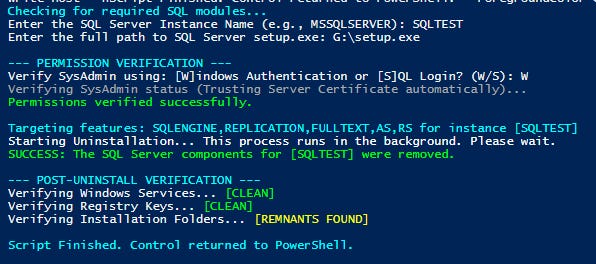
Sample Output :
Thanks VV!!