
Relational Database vs Vector Database
A guide to relational and vector databases — what they are, how they work, and what are the differences.

In this article we will do a detailed comparison of Relational Databases and Vector Databases.
Relational databases have been in use since the 1970s and still dominate transactional computing today. Vector databases existed long before modern generative AI, but the rise of transformer models, embeddings, semantic search, and retrieval-augmented generation (RAG) dramatically accelerated their adoption.
These are two fundamentally different kinds of databases, built for two fundamentally different questions. A relational database is useful for “find me exactly this.” A vector database useful for “find me something like this.” That gap — exact versus similar — shapes everything else: how data is stored, how it’s searched, how it scales, and how much it costs.
Side-by-Side Comparison : Relational Database and Vector Database
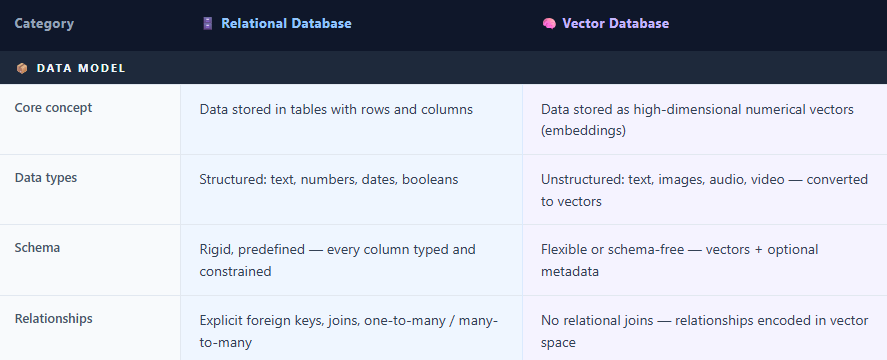
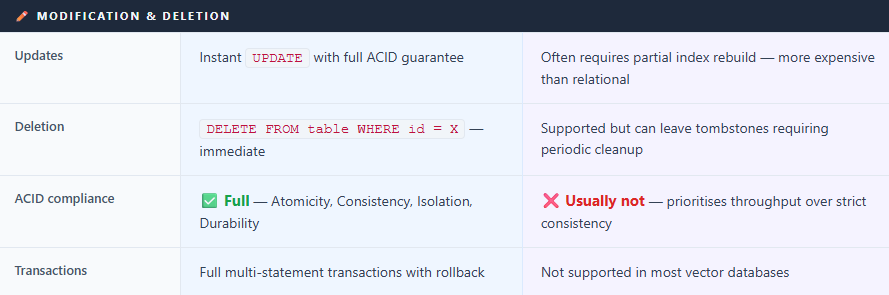
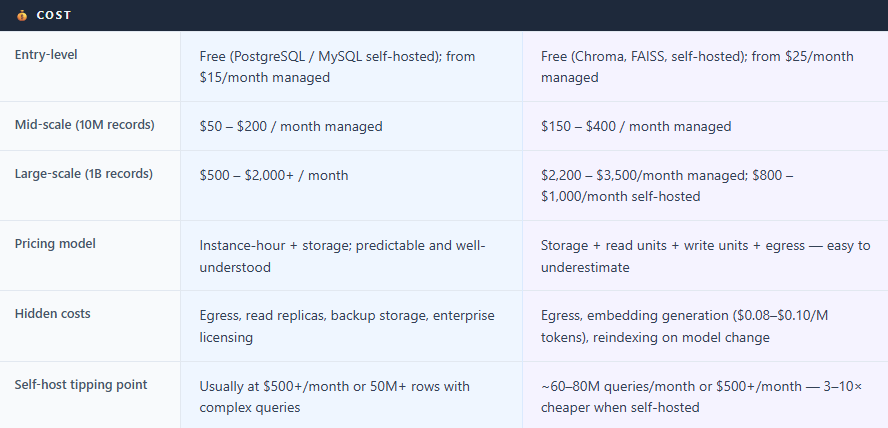
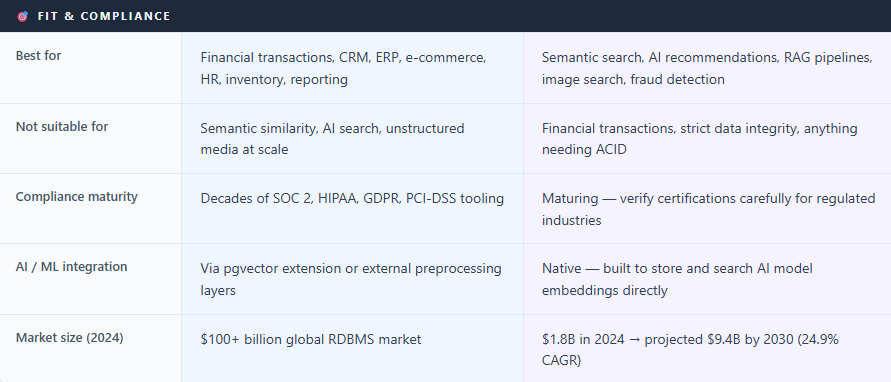
In a relational database data is stored in tables, organised into rows and columns. Tables link to each other through keys, Constraints and we can query using SQL, which has become one of the most enduring technologies in computing history.
A vector database does something completely different. Instead of storing a row of attributes name, email, age and so on it stores a vector: essentially a long list of numbers. When an AI model processes a piece of text, an image, or an audio file, it converts that content into a vector (often ranging from a few hundred to several thousand dimensions depending on the model) that encodes the meaning of that content mathematically. Things with similar meaning end up close together in this mathematical space. A vector database’s entire job is to find which stored vectors are closest to a query vector a task called similarity search.
How Data Is Stored
In a relational database, storage is rigid by design. Before we store data we need to define schema, relations and so on in short a blueprint specifying every column, its data type, and constraints. A users table might have columns for id, email, mobile, and country. This structure guarantees consistency and makes complex relationships auditable.
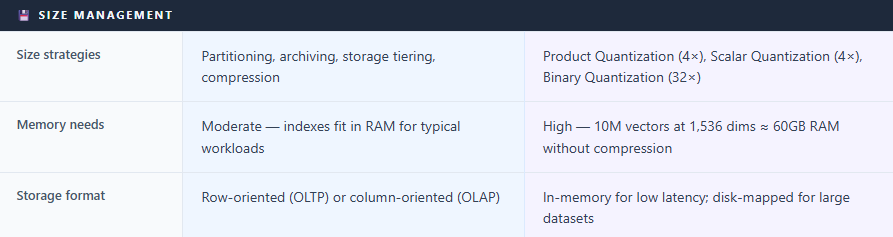
Vector databases generally use more flexible schemas than relational databases. The primary stored object is a vector embedding accompanied by metadata fields. The core unit of storage is a high-dimensional vector produced by a machine learning embedding model, stored alongside lightweight metadata — an ID, a timestamp, a category tag. The database primarily operates on numerical embeddings rather than the raw source content, although embedding quality and behavior still depend heavily on the model and modality used. The critical challenge with vectors is size: High-dimensional vectors can consume substantial memory. For example, 100 million 1536-dimensional float32 vectors require roughly 614 GB of raw storage, HNSW indexes significantly increase memory usage because they maintain graph connections in memory for fast approximate nearest-neighbor search. However, SSD-optimized ANN systems such as DiskANN, along with vector quantization techniques, can significantly reduce memory usage, sometimes by 4× or more depending on the compression strategy and acceptable recall trade-offs.
How Data Is Retrieved
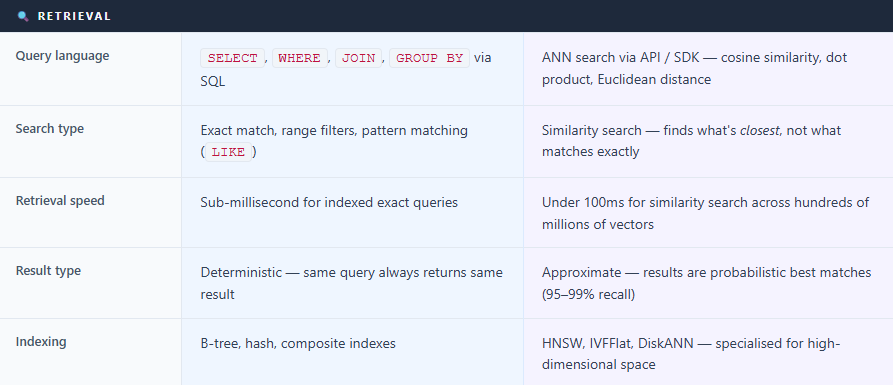
A relational database retrieves data through deterministic queries. We write SQL — SELECT * FROM orders WHERE customer_id = 42 AND status = 'shipped' — and we get exactly the rows that match the query criteria. No ambiguity. The result is precise, repeatable, and predictable.
A vector database retrieves through similarity search. We provide a query vector the embedding of “comfortable running shoes for long distances” — and it returns the stored vectors closest match to that query in mathematical space. It might surface trail runners, marathon shoes, and cushioned trainers even though those exact words were not specified in the query. This is Approximate Nearest Neighbor (ANN) search, and the HNSW is currently one of the most widely used ANN indexing algorithms in production vector systems and can achieve sub-100ms search latency at very large scale depending on hardware and tuning.
“The word ‘approximate’ matters. Most vector databases trade a small amount of accuracy for massive gains in speed — typically achieving 95–99% recall at millisecond latency.”
How Performance Is Improved
Relational databases
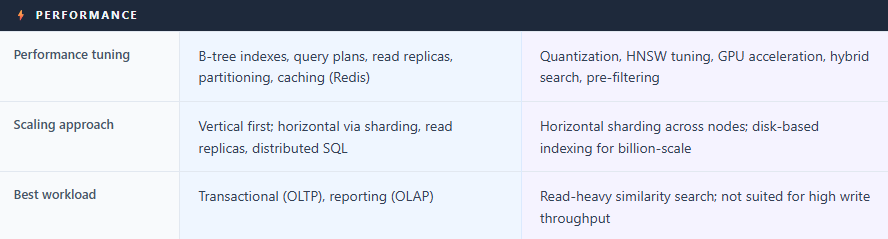
Indexes — B-tree or composite indexes or other type of indexes on frequently queried columns
Query optimization — execution plan analysis to eliminate expensive operations
Caching — External caches like Redis or Memcached — along with internal database buffer caches — help keep frequently accessed data in memory.
Read replicas — route read queries to replica instances
Partitioning — split large tables across physical storage by date or region
Vector databases
Index type selection — HNSW for speed; IVFFlat is commonly used to improve scalability and reduce search cost at large scale, though it typically trades some recall accuracy for performance gains.
Quantization — scalar (4× compression), binary quantization can achieve very high compression ratios, though exact savings depend on implementation and data representation.
GPU acceleration — Several vector systems and ANN libraries now support GPU acceleration for indexing and retrieval, including Milvus/Zilliz, FAISS, Qdrant integrations, and NVIDIA RAPIDS/cuVS-based implementations.
Hybrid search — combining vector similarity with keyword (BM25) search improves result quality
Metadata pre-filtering — narrowing the search space before scoring reduces compute cost dramatically
Managing Size
Relational databases scale vertically first more CPU and RAM and then horizontally via sharding and read replicas. Managed services like Amazon Aurora and Google Cloud Spanner have made horizontal scaling far more accessible, though it still requires architectural planning.
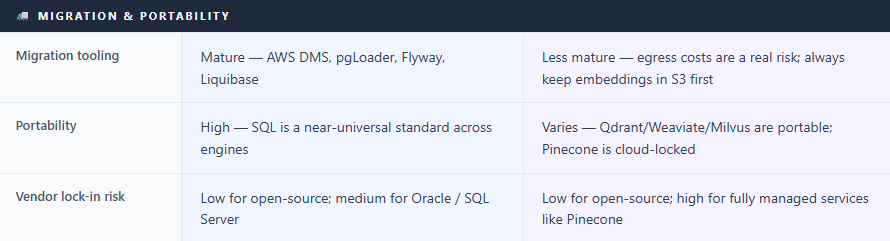
Vector databases face a distinct challenge: vectors are memory-hungry. The strategies are quantization (compressing vectors), memory-mapped storage (loading from disk on demand), and sharding across nodes. One critical operational fact: if you change your embedding model, you must re-vectorize your entire dataset. Every document reprocessed, every index rebuilt. For large datasets, this is a significant undertaking worth planning for from day one.
Tools to Access Them
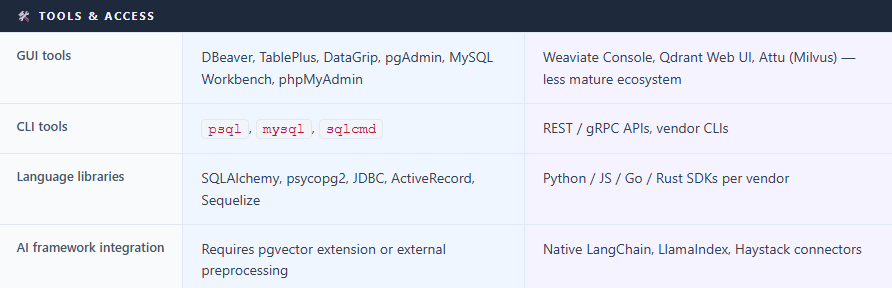
For relational databases, the tooling ecosystem is enormous and mature: SSMS, DBeaver, TablePlus, DataGrip, pgAdmin, MySQL Workbench, and phpMyAdmin for GUI access; psql and mysql for the command line; SQLAlchemy, JDBC, and ActiveRecord for application code. Every major programming language has first-class SQL support.
For vector databases, tooling is newer but growing fast. Most major providers Pinecone, Weaviate, Qdrant, Milvus offer Python, JavaScript while Go, Java, and Rust support varies by platform. LangChain and LlamaIndex have native connectors for all of them, making it a single configuration line to wire a vector store into an AI pipeline. GUI tools like Weaviate’s cloud console and Qdrant’s built-in web UI exist, but are less mature than their SQL equivalents.
Popular Providers
Relational Databases
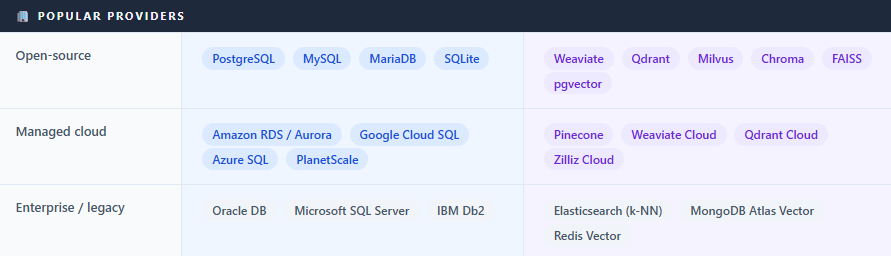
Microsoft SQL Server — Enterprise standard in Windows-centric organisations, tightly integrated with Azure.
PostgreSQL — Open-source, the most feature-rich SQL database. Free to self-host. De facto choice for most new projects.
MySQL / MariaDB — The classic web database powering most of WordPress.
Oracle Database — Dominant enterprise RDBMS for large corporations, known for reliability and high licensing costs.
Amazon RDS / Aurora — AWS’s managed service supporting PostgreSQL, MySQL, SQL Server, Oracle, and MariaDB.
Google Cloud SQL / AlloyDB — Google Cloud SQL is Google’s managed relational database service supporting PostgreSQL, MySQL, and SQL Server, while AlloyDB is its high-performance PostgreSQL-compatible offering.
Azure SQL Database — Microsoft’s cloud-native SQL Server, ideal for organisations already in the Microsoft ecosystem.
Vector Databases
Pinecone — Fully managed, serverless, zero ops overhead.
Weaviate — Open-source (BSD-3), excellent hybrid search. Pricing and managed-service tiers vary frequently and should be verified on official vendor pricing pages, but their biggest value-add now is GPU acceleration; self-hosting free.
Qdrant — Open-source (Apache 2.0), written in Rust, known for low latency. Qdrant has introduced GPU-accelerated capabilities and integrations for high-performance workloads.
Milvus / Zilliz — Open-source, designed for billion-scale deployments. GPU-accelerated. Zilliz is the managed cloud version. Milvus/Zilliz can integrate NVIDIA’s cuVS/CAGRA acceleration for high-speed GPU indexing and search.
Chroma — Open-source, lightweight, popular for local development. Free.
FAISS — Meta’s open-source similarity search library. Not a full database (no persistence or API server), but extremely fast and widely used as a building block. If you use FAISS, you have to build your own "wrapper" for things like persistence, API access, and metadata filtering.
pgvector — A PostgreSQL extension adding vector search to existing Postgres. Pragmatic choice for teams already on Postgres. Recent pgvector improvements significantly improved large-scale vector search performance, and many teams now successfully run very large vector workloads directly inside PostgreSQL depending on infrastructure and tuning. pgvector and hybrid databases are increasingly viable for many medium-scale workloads, while specialized vector databases remain valuable for very large-scale, distributed, GPU-intensive, or operationally complex deployments.
Majority of the organisations building AI applications still run relational databases for transactional workloads alongside a vector database for semantic retrieval.
PostgreSQL with pgvector can do vector similarity search directly in SQL. SingleStore has a native
VECTORdata type. MongoDB Atlas added vector search. For teams with smaller vector workloads, these hybrid options eliminate a separate database entirely.Relational database ecosystems have decades of mature tooling, operational practices, and vendor support for compliance-oriented environments such as SOC 2, HIPAA, and GDPR. Vector databases are newer and the compliance landscape is still maturing. In healthcare, finance, or any regulated industry — verify certifications carefully before committing to a managed vector database.
Thanks VV!!
Sources Referenced
Instaclustr: Vector Database vs. Relational Database (October 2025)
DiffStudy: Vector Database vs Relational Database Full Comparison 2026
DataCamp: Best Vector Databases 2026
Firecrawl: Best Vector Databases in 2026 — A Complete Comparison Guide
TensorBlue: Vector Database Comparison 2025 (Pinecone, Weaviate, Qdrant, Milvus)
Actian: The Hidden Cost of Vector Database Pricing Models (February 2026)
Introl: Vector Database Infrastructure — Pinecone, Weaviate, Qdrant at Scale (January 2026)
DBVis: Best SQL Clients for Developers
AWS: Amazon RDS Pricing
Rahul Kolekar: Top 5 Vector Databases for Enterprise RAG — Cost Comparison (January 2026)